24/7 Live Support Chat & SMS (949) 566-5545
Our Global Support Team
Is Here 24/7
To Assist You In Every Way!
Our 24/7 in-house team of experts are always on hand to help answer your questions, processing your order or guide you to install your subscription.
You can chat, text or email us at any time!
We created a step by step tutorials to help you install your 7UP TV media for your preferred devices
Install for Android Devices & Amazon Fire TV Stick
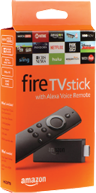
Install Fire TV Stick:
FOXTV was designed to work perfectly on the Amazon Fire TV Stick. You can simply purchase a fire stick from any local retailer near you (Walmart, Target, Best Buy or Amazon.com)
1.) Download and Setup Instructions for Fire TV Stick: Click Here
2.) Amazon Fire Stick Developer Option Bypass: Click Here
URL for Downloading 7UPTV App: 7uptv.com/7up.apk

Android Cell Phones & Devices
Install on Android Phone & Tablets
7UPTV also provides you with an Android application players directly from the Google App Store. You can simply click on the links below to install on your Android phone:
Download 7UPTV "USA" App: 7uptv.com/7up.apk
Download Instructional Outline
SMART TV Download
Install on Smart TV (without Fire Stick or Android Player)
7UPTV also provides you with a direct application player directly from the
Google App Store. You can simply click on the link below to get install instructions directly on your Smart TV's.
Download Instructional Outline:
https://7uptv.com/install_smartv.pdf
Parental Control - Your 7UPTV application includes a strict parental control function that limit and restrict any unwanted viewing by setting up a channel lock.
SMS Text Support (fastest response): 1 (949) 566-5545
Email Support: contactus@7uptv.com
24/7 Live Chat:
Please click on Chat Button on bottom right